How beverage distributor customer invoices payments + inventory in one platform keep invoicing accurate
Make sure invoices match what you actually sell and ship.
One customer ledger
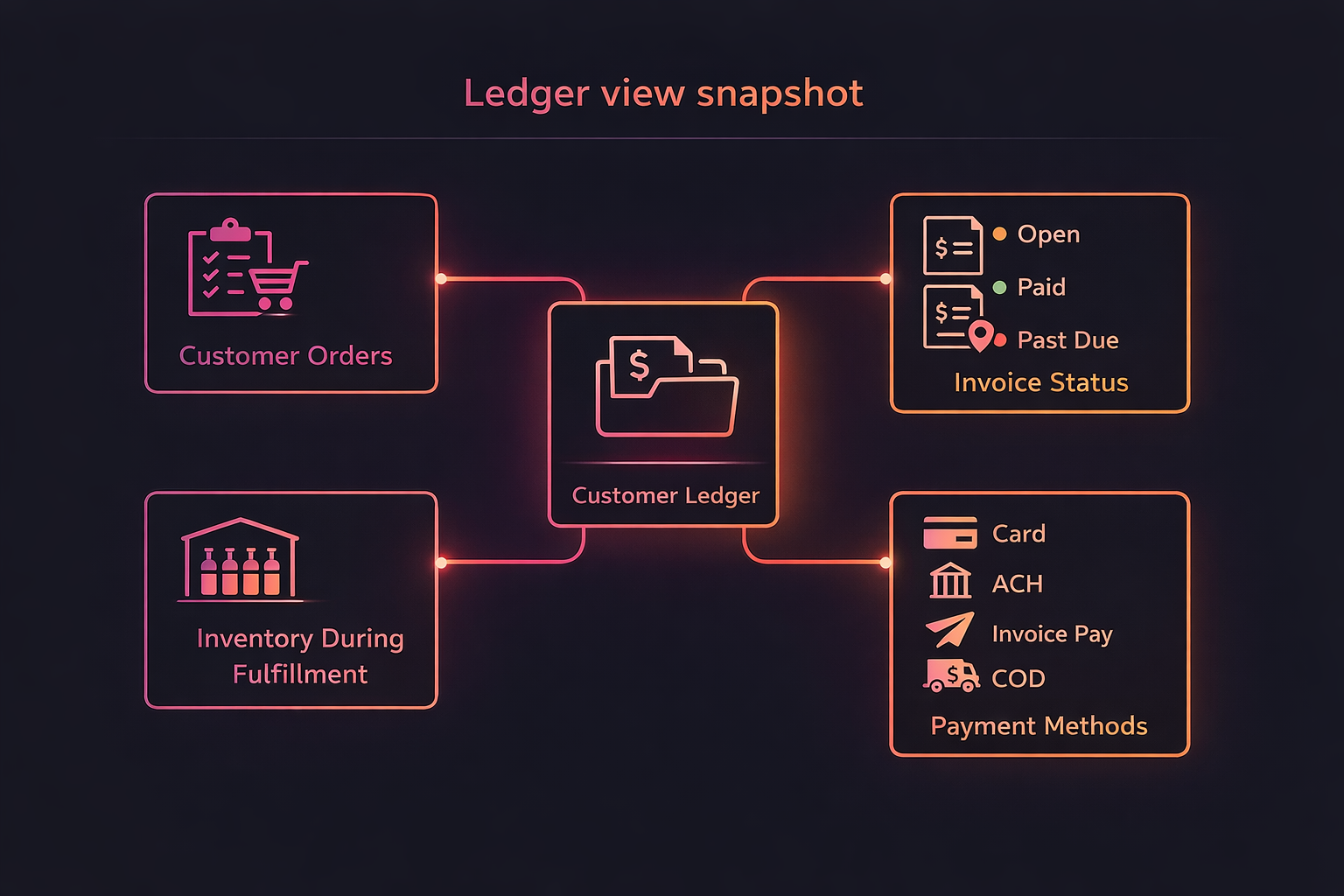
See orders, invoice status, and payment activity connected to the correct wholesale customer record.
Payment methods tied to invoices
Track card, ACH, invoice pay, and COD while preserving invoice-level status (open, paid, past due).
Inventory visibility for invoicing
Handle on-hand and backorders so your invoices reflect real availability instead of manual reconciliation.
Replace spreadsheet-based AR workflows
Stop copying invoice totals and chasing confirmations.
Spreadsheet invoice tracking
Invoice status stays updated as customers pay, so your team works from one source of truth.
Disconnected invoicing + payments
Payments reconcile back to invoice balances, reducing errors and disputes.
Manual inventory-to-invoice checks
When inventory changes, invoicing stays aligned with what you sell and fulfill.
What you get
Orders to invoicing to payment activity to invoice ledger
Invoices grouped to your process
Configure workflows so customers can settle what they owe without unnecessary steps.
Clear payment timelines
Track which invoices remain open and which have been paid as activity happens.
Less tool stitching
CRM, invoicing, payments, and inventory work together so teams stop rebuilding reports.
Invoices, payments, and inventory - kept in sync
Stop spreadsheet AR and disconnected invoicing workflows
One customer ledger for the wholesale account
Beverage distributors don't just need invoices - they need the customer context behind the invoices. Wholtra keeps customer orders, invoice status, and payment activity connected so your team stops reconciling in separate tools.
Inventory visibility during fulfillment
When on-hand changes or backorders happen, invoices should reflect reality without rework. Inventory visibility helps ensure your invoice tracking stays accurate instead of requiring manual corrections.
Payment status tied back to invoices
Your payment workflow becomes cleaner when payments update invoice balances automatically. That means fewer follow-ups, less ambiguity for your AR team, and faster collections.
Ledger view snapshot
See customer invoice status, payment activity, and on-hand inventory in one flow
Beverage distributor FAQ
Invoice status, payment methods, and AR clarity
How do payment updates affect what our team sees in AR?
Payment activity updates the invoice balances so AR stays current without you manually updating "paid" status in spreadsheets. That keeps reconciliation predictable and improves collection follow-up.
AR teams spend less time hunting for deposits and more time reviewing what is still open by customer and invoice. When payment activity posts, the invoice ledger stays consistent so status calls are faster and disputes are easier to resolve.
What changes when we handle partial shipments or backorders?
Inventory visibility helps ensure invoices reflect what was actually shipped or still outstanding. Your invoice tracking remains connected to the workflow, reducing "invoice mismatch" confusion.
Instead of guessing how much of an order is fulfilled, your workflow keeps invoices aligned with what is pending and what is delivered. That clarity helps both your AR team and your customers understand why an invoice is partially paid or still open.
Is Wholtra still a disconnected invoicing + payment setup?
No. Wholtra ties invoices and payment methods back to the same customer workflow. Your team works from one connected workflow instead of stitching data between separate tools.
You can keep your internal processes, but the data model stays connected. That means fewer "rebuild the ledger" moments and less spreadsheet reconciliation after every payment batch. The result is a cleaner AR workflow from order entry to invoicing to payment status.